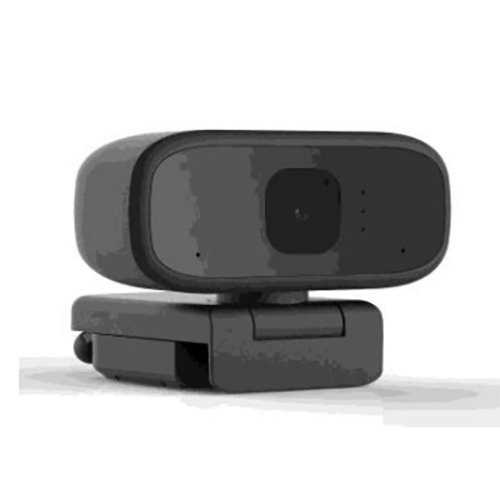
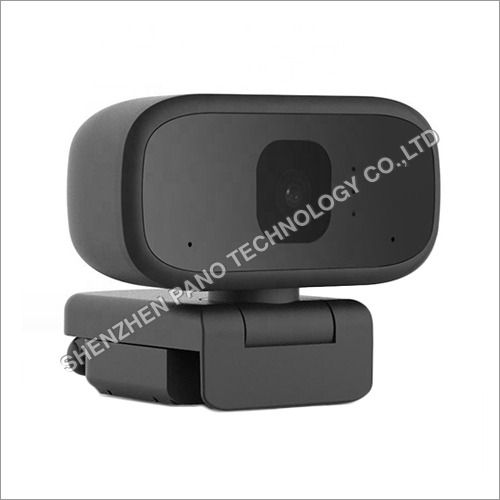
About P120 Web Cam
Specifications :
- DSP JL5224 + GC1054
- Video : 1920x1080P
- Audio Built-in Microphone
Function: Feature:
- 1.Built-in microphone, your voice can be heard clearly in 10 meters.
- 2.Great quality and exquisite appearance.
- 3.The head can be rotated freely up and down 85 degrees, and the angle can be easily adjusted
- 4.Specialized optical lens, high precision.
- 5.Designed for both laptop and desktop.
- 6.Auto white balance, auto color correction.
- 7.Manual adjustable focal length.
- 8.Supports Windows 2000 / XP / window7 / win8 / window10 / Vista 32-bit etc.
- 9.Support CC2000, web conferencing, WEChat, WhatsApp, Yahoo Messenger and Skype.
Shipping Information :
Details |
Minimum Order Quantity | 100 Piece |
Product Code | P120 |
Country of Origin | China |
Unit of Measure | Piece |
Price Or Price Range | Quantity | Price ($) |
100-1000 | 5 |
1000- | 4.5 |
Unit of Price | piece |
supply Ability | 10000 piece/month |
Delivery Time | 15-30 day |
Trade Information |
FOB Port | Shenzhen |
Payment Terms | Paypal |
sample Available | Yes |
Packaging Details | Size | 52.5x36x32.5 (CM) |
Quantity | 50 |
Weight | 15Kg |
Main Export Markets | Asia, Middle East, South America, North America, Western Europe, Central America |
Main Domestic Market | All India |
Keywords For Seo
- Full Hd Web Camera
- Web Camera With Light
- Ring
- Webcam
- Webcam with microphone
- Computer camera
- Usb camera
- Camera for computer
High-Quality Video and Audio for Every SettingThe P120 Web Cam boasts a high-definition CMOS sensor and an enhanced low-light correction feature. Its 720p resolution at 30 FPS guarantees sharp visuals, while an integrated digital microphone delivers clear sound, making it perfect for video calls, live streaming, or virtual meetings-even in dim environments.
Seamless Connectivity and Versatile CompatibilityEnjoy true plug-and-play convenience with the USB 2.0 interface. The webcam works effortlessly across major platforms including Windows, Mac OS, and Linux. Its compact and lightweight design, powered directly through your USB port, ensures hassle-free installation and portability wherever you go.
Flexible Mounting and User-Friendly OperationThe universal clip securely attaches to laptops or monitors, while the 360-degree rotatable design lets you position the camera exactly how you need. Manual focus adjustment ensures your image is always crisp, and the wide-angle lens captures more of your surroundings-ideal for individual and group calls.
FAQ's of P120 Web Cam:
Q: How do I install the P120 Web Cam on my computer or laptop?
A: Simply connect the webcam to your device using the included USB 2.0 cable. No additional software or drivers are needed thanks to its plug-and-play design. The universal clip allows quick and secure attachment to a laptop or monitor.
Q: What platforms and operating systems are supported by the P120 Web Cam?
A: The P120 Web Cam is compatible with Windows, Mac OS, and Linux operating systems, making it suitable for a wide variety of computers and laptops.
Q: Where can the P120 Web Cam be used effectively?
A: Designed for versatility, the webcam is ideal for desktops, laptops, video conferencing, online classes, and live streaming. Its compact size and universal mounting clip make it easy to use at home, in the office, or on the go.
Q: What is the benefit of enhanced low-light correction in this webcam?
A: Enhanced low-light correction improves video clarity and brightness in dim environments, allowing you to look your best during calls and recordings without additional lighting equipment.
Q: How do I adjust the focus or angle of the P120 Web Cam?
A: The webcam features a manual focus ring, enabling fine tuning for sharp images. Its 360 rotatable design lets you easily adjust the angle to perfectly frame your shot.
Q: What steps should I follow if the built-in microphone is not working?
A: Ensure the webcam is properly connected to a powered USB port. Check your device's audio settings to confirm the P120's microphone is selected as the input source. If issues persist, try reconnecting or testing on a different port or device.









 Send Inquiry

 Send Inquiry
 Send Inquiry
 Send SMS